 OpenClaw
 企业微信
企业微信OpenClaw 企业微信(WeCom)Channel 插件
💡 核心价值:为什么选择OpenClaw 企业微信插件?
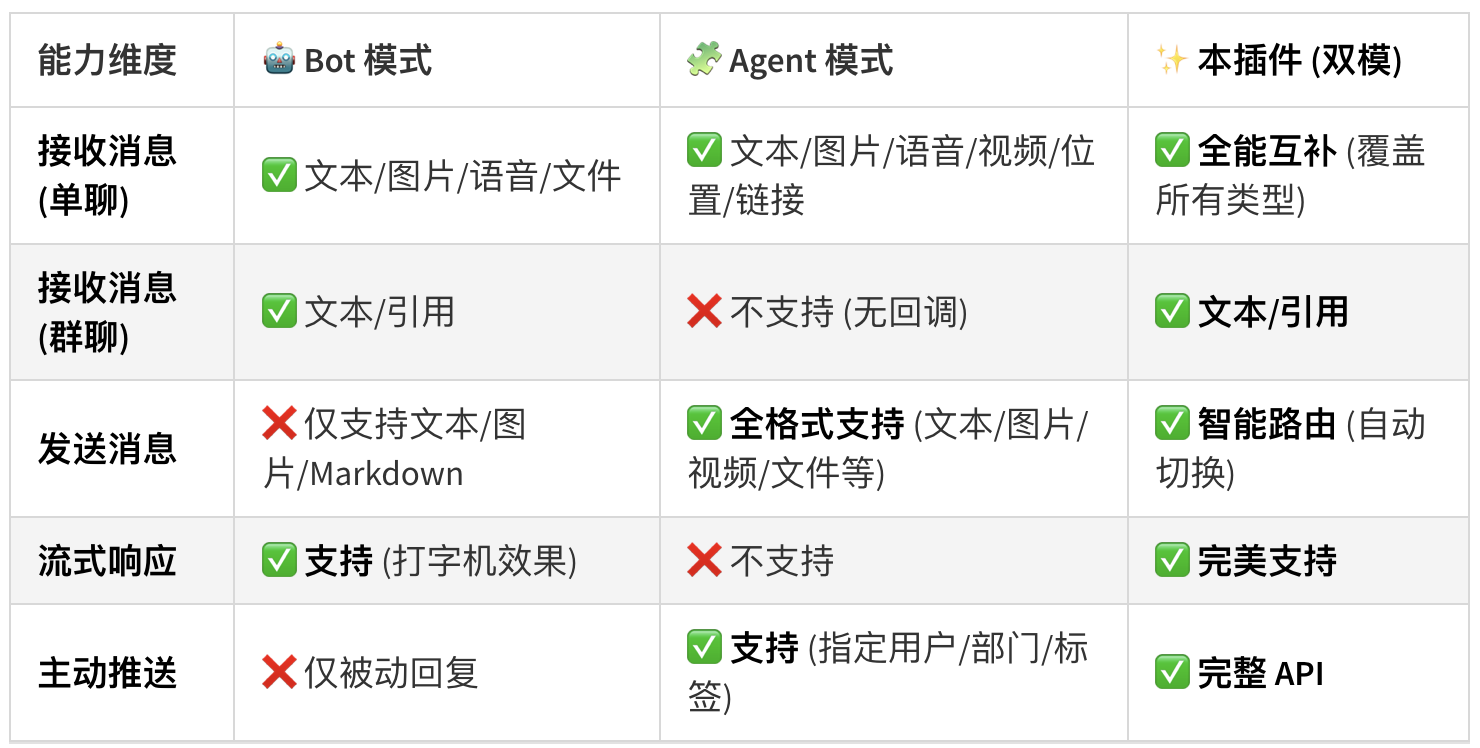
🏗 独创架构:Bot + Agent 双模融合
OpenClaw 企业微信插件项目地址:https://www.npmjs.com/package/@yanhaidao/wecom
传统的企微插件通常只能在 "只能聊天的机器人 (Bot)" 和 "只能推送的自建应用 (Agent)" 之间二选一。 本插件采用 双模并行架构,同时压榨两种模式的极限能力:
Bot 通道 (智能体):负责 实时对话。提供毫秒级流式响应(打字机效果),零延迟交互。
Agent 通道 (自建应用):负责 能力兜底。当需要发送图片/文件、进行全员广播、或 Bot 对话超时(>6分钟)时,无缝切换到 Agent 通道接管。
🧩 功能特性全景
- 🗣 沉浸式交互 (Immersive Interaction)
原生流式 (Stream):基于 HTTP 分块传输,拒绝 "转圈等待",体验如 ChatGPT 网页版般丝滑。
交互式卡片 (Card):支持 Button/Menu 交互回传,可构建审批、查询等复杂业务流 (Agent模式)。
- 📎 全模态支持 (Multi-Modal)
发什么都能看:支持接收图片、文件 (PDF/Doc/Zip)、语音 (自动转文字)、视频。
要什么都能给:AI 生成的图表、代码文件、语音回复,均可自动上传并推送到企微。
- 📢 企业级触达 (Enterprise Reach)
精准广播:支持向 部门 (Party)、标签 (Tag) 或 外部群 批量推送消息。
Cronjob 集成:通过简单的 JSON 配置实现早报推送、日报提醒、服务器报警。
- 🛡 生产级稳定 (Production Ready)
容灾切换:Bot 模式 6 分钟超时自动熔断,切换 Agent 私信送达,防止长任务回答丢失。
Token 自动运维:内置 AccessToken 守护进程,自动缓存、提前刷新、过期重试。
OpenClaw 企业微信插件快速开始安装教程
1. 安装插件
openclaw plugins install @yanhaidao/wecom
openclaw plugins enable wecom
也可以通过命令行向导快速配置:
openclaw config --section channels- 配置 Bot 模式(智能体)
openclaw config set channels.wecom.enabled true
openclaw config set channels.wecom.bot.token "YOUR_BOT_TOKEN"
openclaw config set channels.wecom.bot.encodingAESKey "YOUR_BOT_AES_KEY"
openclaw config set channels.wecom.bot.receiveId ""
openclaw config set channels.wecom.bot.streamPlaceholderContent "正在思考..."
openclaw config set channels.wecom.bot.welcomeText "你好!我是 AI 助手"

# DM 门禁(推荐显式设置 policy)
# - open: 默认放开(所有人可用)
# - disabled: 全部禁用
# - allowlist: 仅 allowFrom 允许的人可用
openclaw config set channels.wecom.bot.dm.policy "open"
# policy=allowlist 时生效(例如只允许某些 userid;"*" 表示允许所有人)
openclaw config set channels.wecom.bot.dm.allowFrom '["*"]'- 配置 Agent 模式(自建应用,可选)
openclaw config set channels.wecom.enabled true
openclaw config set channels.wecom.agent.corpId "YOUR_CORP_ID"
openclaw config set channels.wecom.agent.corpSecret "YOUR_CORP_SECRET"
openclaw config set channels.wecom.agent.agentId 1000001
openclaw config set channels.wecom.agent.token "YOUR_CALLBACK_TOKEN"
openclaw config set channels.wecom.agent.encodingAESKey "YOUR_CALLBACK_AES_KEY"
openclaw config set channels.wecom.agent.welcomeText "欢迎使用智能助手"
openclaw config set channels.wecom.agent.dm.policy "open"
openclaw config set channels.wecom.agent.dm.allowFrom '["*"]'- 高级网络配置 (公网出口代理)
如果您的服务器使用 动态 IP (如家庭宽带、内网穿透) 或 无公网 IP,企业微信 API 会因 IP 变动报错 60020 not allow to access from your ip。 此时需配置一个固定 IP 的正向代理 (如 Squid),让插件通过该代理访问企微 API。
openclaw config set channels.wecom.network.egressProxyUrl "http://proxy.company.local:3128"- 验证
openclaw gateway restart
openclaw channels status
 E7AI
E7AI Chatgpt
 DeepSeek
 飞书
飞书 1Panel
 Gemini
 ComfyUI
 Claude Code
 OpenCode
 Cursor
 Sora
Sora Openclaw-CN

